
Screenshot, area or recording
One click captures the visible page, a dragged area, or a video of the tab with optional voice narration. Shortcut: Alt+Shift+P.
Chrome extension · free · no account
Screenshot or record the bug. Console errors, failed requests and repro steps are attached automatically, and passwords, tokens and keys are redacted before anything leaves your browser.
Features
A good bug report has the picture, the logs and the steps. A safe one leaves out the session tokens, passwords and customer data that logs are full of.
One click captures the visible page, a dragged area, or a video of the tab with optional voice narration. Shortcut: Alt+Shift+P.
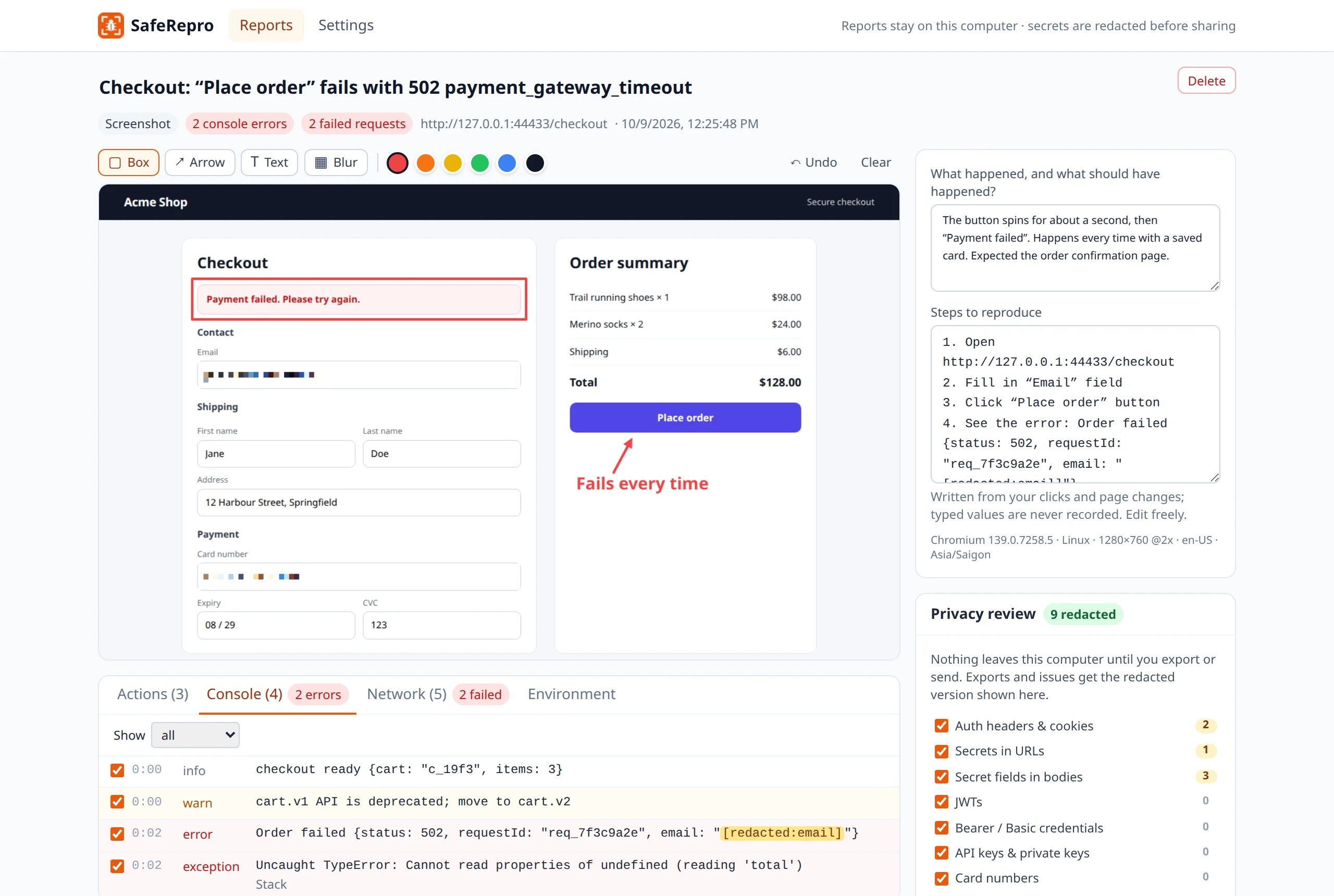
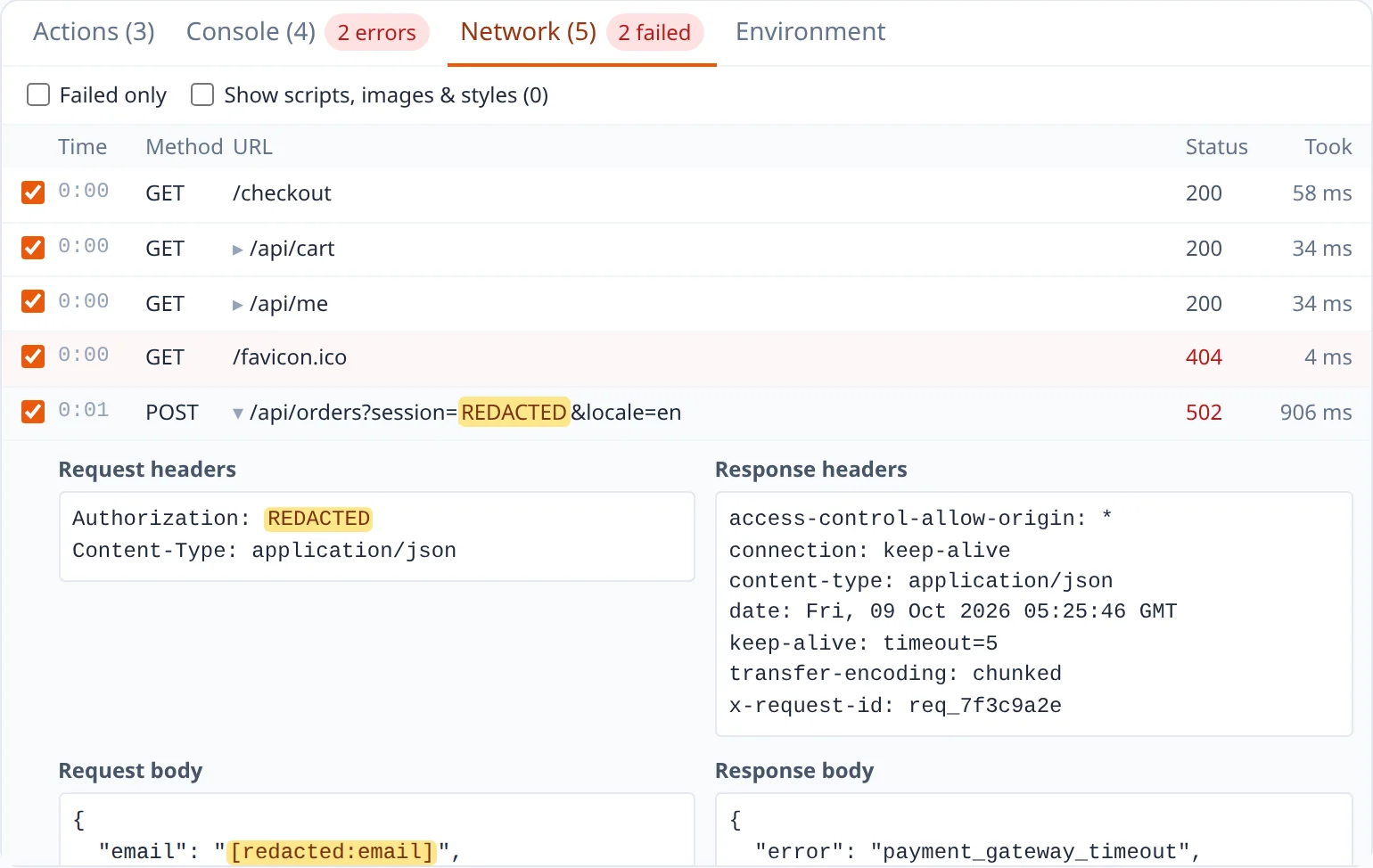
Console errors and warnings, uncaught exceptions, failed requests with status, timing and headers, and the clicks that led there.
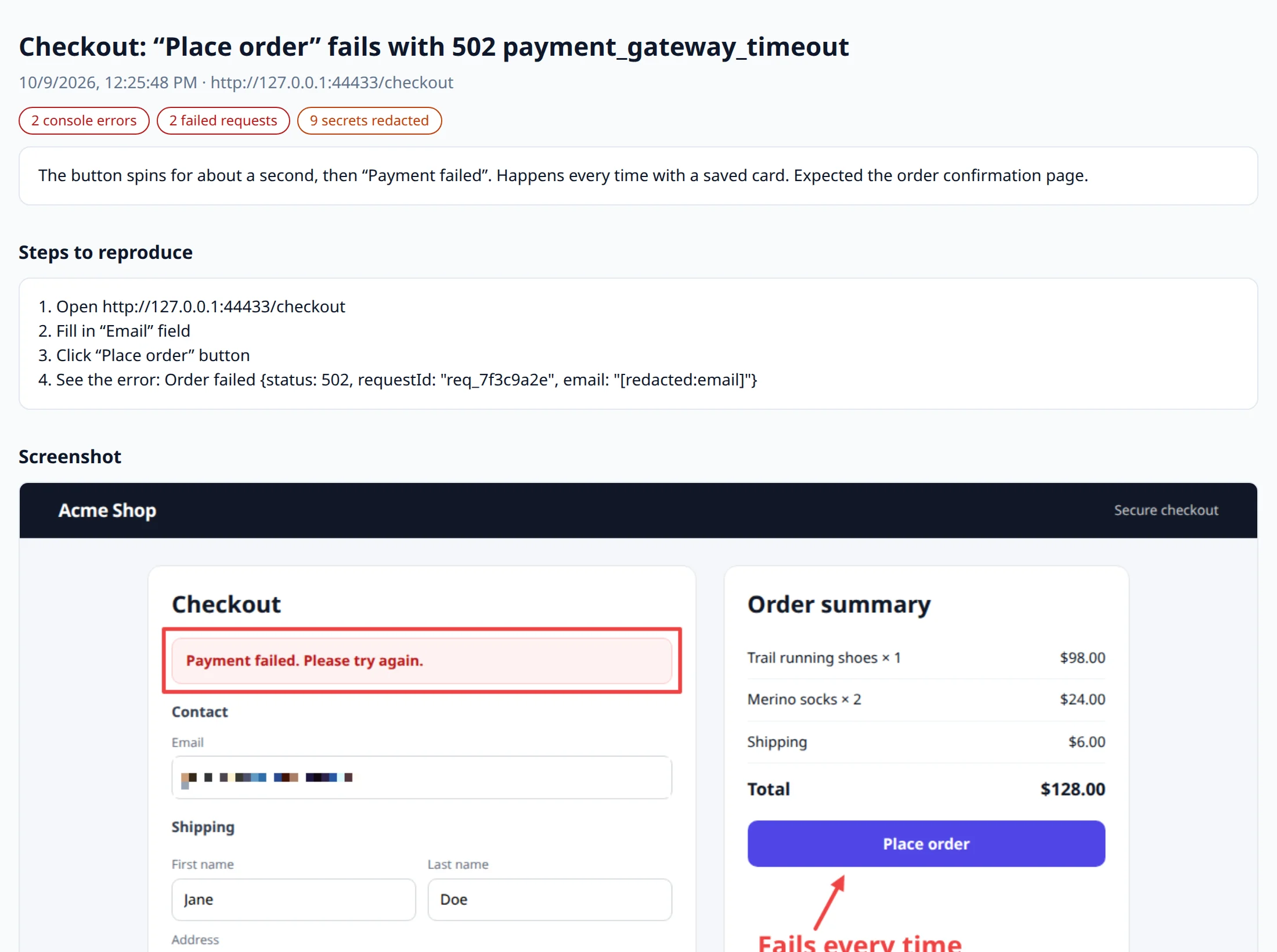
“Open the page, fill in Email, click Place order, see the error.” Built from what you did. What you type into fields is never recorded.
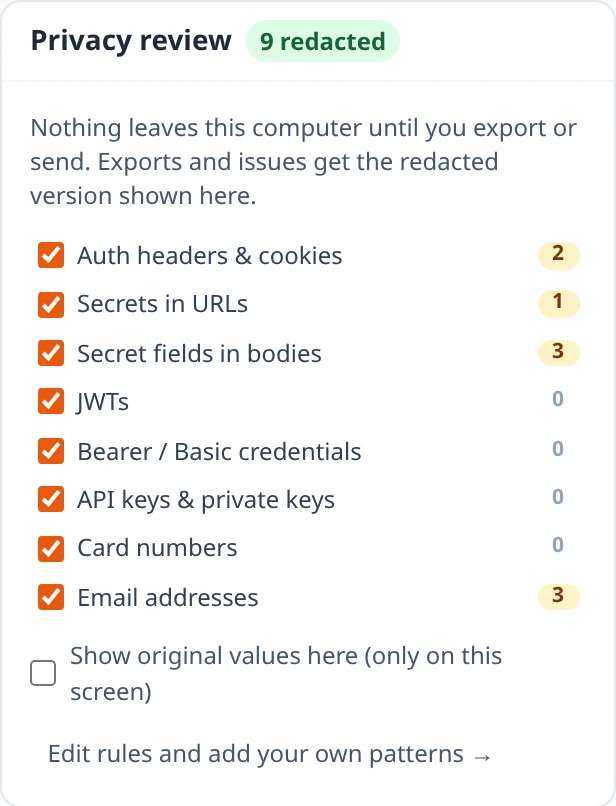
Tokens, cookies, passwords, API keys, card numbers and emails are hidden in your browser, before you export or send anything. Add your own patterns.
Boxes, arrows and notes in six colours. Blur destroys the pixels under it in every export, so a customer’s data on screen stays private too.
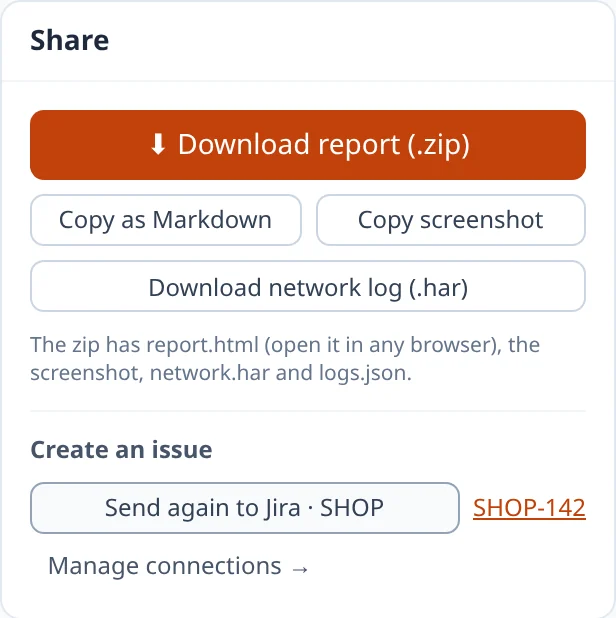
Create a Jira issue with the files attached, a GitHub or Linear issue, or download one zip with an HTML report, the video and a HAR file.
How it works
Take a screenshot, select an area, or record the tab. Logs come along automatically, from page load on the sites you choose.
The privacy review lists everything that was hidden, rule by rule. Switch a rule off for this report, or leave a log row out, before anything leaves.
File it straight into Jira, GitHub or Linear with your own token, or download a zip any engineer can open, no account needed.
Redaction
A single failed request can carry a session token, a customer’s email and their card number. SafeRepro finds them in URLs, headers, bodies and console messages, and replaces them on your computer before you share.
POST /api/orders?session=sess_8f2a61c9e0
Authorization: Bearer eyJhbGciOiJSUzI1NiIs…
Cookie: sid=9d1f04c2; csrftoken=Zx81Qe

{ "email": "jane.doe@acme-mail.com",
  "cardNumber": "4242424242424242",
  "cvc": "123", "amount": 12800 }

console.error AWS key AKIAIOSFODNN7EXAMPLE rejected
POST /api/orders?session=REDACTED
Authorization: REDACTED
Cookie: REDACTED

{ "email": "[redacted:email]",
  "cardNumber": "REDACTED",
  "cvc": "REDACTED", "amount": 12800 }

console.error AWS key [redacted:key] rejected
Customer IDs, account numbers, internal hostnames: add a pattern like CUS-\d{6} and it becomes [redacted:customer-id] everywhere. Test it live in Settings.
And if the title or description you typed looks like it contains a secret, SafeRepro warns you before you send.
For the engineer who fixes it
Every failed request with its status, timing, headers and response. Every console error with its stack. The clicks that led there, lined up with the recording.
Integrations
Connect Jira, GitHub or Linear with your own token. Issues are created straight from your browser; SafeRepro has no server in between.
Steps, environment, errors and failed requests in the description; the zip, screenshot and recording attached to the issue.
A Markdown issue in the repository you choose, with your labels. Drag the zip in for the files.
An issue in the team you pick, with the full Markdown description.
Opens in any browser, offline. Console, network and actions tables, filters, and click-to-jump in the recording.
Import it into DevTools → Network, or any HAR viewer, with secrets already removed.
Steps, environment, top errors and failed requests, ready to paste into any issue or chat.
MP4 or WebM recording, and the annotated screenshot as PNG, also copyable to the clipboard.
Privacy
A bug reporter sees your pages, so it should earn your trust. SafeRepro asks only for what each feature needs, when you use it, and keeps reports on your computer.
| Permission | Asked | Why it’s needed |
|---|---|---|
| Active tab | No warning | Read and capture the tab you clicked SafeRepro on, only at that moment. |
| Scripting | No warning | Run the page logger and the area selector in that tab. |
| Storage | No warning | Keep your reports, screenshots and recordings on your computer. |
| Offscreen, alarms, context menu | No warning | Record video in the background, delete old reports, add “Report a bug” to the right-click menu. |
| Tab capture | Asked on your first recording | Record the tab as video. |
| One site | Asked when you choose | “Always record logs on this site”: start logging when the page loads. |
| Your tracker | Asked when you connect it | Create issues in the Jira, GitHub or Linear you connect. |
Reports stay local
Stored in your browser, deleted after 30 days by default.
Nothing in the background
No access to a tab until you click SafeRepro on it.
No analytics
No tracking code, no account, no SafeRepro server.
Pricing
No credit card, no account, no report limits. Team plans are on the way.
Free
$0
everything on your computer
Team
Coming soon
everything in Free, plus
Interested? Tell us about your team.
FAQ
Yes. Everything it does today is free, with no account and no limits. Team plans for your own storage bucket and shared redaction rules are planned; what works on your computer today stays free.
Nowhere, until you decide. Reports, screenshots and recordings are stored in your browser on your computer. They leave only when you download them or send one to a Jira, GitHub or Linear account you connected, and then they go straight there, never through a SafeRepro server (there isn’t one).
Authorization headers and cookies, tokens and signatures in URLs (including the #fragment), passwords and other secret fields in request and response bodies, JWTs, Bearer and Basic credentials, API keys from AWS, GitHub, Slack, Stripe, Google, OpenAI and Anthropic, private keys, card numbers with a valid checksum, and email addresses. You can add your own patterns, such as customer or account numbers, and test them in Settings.
No. SafeRepro records which field you filled in (“Fill in the Email field”), never the value. Passwords never appear in reports. On the screenshot itself, use Blur to hide anything visible on screen.
SafeRepro only touches a tab when you click it (Chrome’s “active tab” permission), so it can’t read the sites you visit in the background. Recording and “always record logs on this site” ask for permission the first time you use them.
Yes, on sites you choose. Click “Always record logs on this site” in the popup: from the next page load, console and network logs are kept from the start, and recordings keep their logs across page loads. On other sites, logs start when you capture, plus the list of requests the page already made.
Jira Cloud (the issue gets the zip, the screenshot and the recording attached), GitHub Issues and Linear. GitHub has no API for attachments, so the issue gets the text and you drag the downloaded zip into it. You can also copy Markdown into any other tool.
Yes. Everything captured from the page is escaped, so a malicious console message can’t run as code, and the report loads nothing from the internet: its content security policy only allows its own small script.
It is built for Chrome on computers (Windows, macOS, Linux and ChromeOS). Edge support is planned. Chrome on phones doesn’t run extensions.
On computers that support Chrome’s built-in AI (Gemini Nano), a “Suggest title” button writes a title and summary on your computer, from the redacted logs only. Nothing is sent to an AI service.
One click for the screenshot, the logs and the steps. Nothing leaves your browser until you say so.